Dec 24, 2016

Parquet file query DSL with parboiled

Now that we know how to push down Parquet predicates the next logical step is to come up with a DSL to make writing predicates easier. The DSL would be handy for debugging, especially if it can be implemented with few additional dependencies. Running Spark just to have access to Dataset query syntax is not always convenient.

What I have in mind is something very straightforward, after all there is little else to express than predicates. It could be as simple as "SELECT * FROM '/tmp/somefile.par' WHERE ('column1'=42) || ('column2'=24)" to filter a file by a couple of columns.
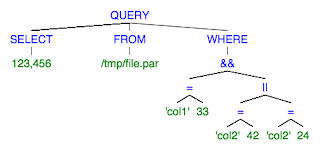
http://mshang.ca/syntree/?i=%5BQUERY%20%5BSELECT%20123%2C456%5D%20%5BFROM%20%2Ftmp%2Ffile.par%5D%20%5BWHERE%20%5B%26%26%20%5B%3D%5B'col1'%5D%20%5B33%5D%5D%20%5B%7C%7C%20%5B%3D%5B'col2'%5D%20%5B42%5D%5D%20%5B%3D%5B'col2'%5D%20%5B24%5D%5D%5D%5D%5D%5D

When I think about query parsers ANTLR is the default choice. Its functionality, stability, and documentation are outstanding. But the syntax I mentioned makes me think that a lighter approach could be possible. So to a significant degree this exercise will be an attempt to compare a few parser libraries in the context of very small DSLs.

I decided to start with a heterogeneous AST representation and the pseudo-SQL syntax I mentioned above. To evaluate the alternatives I am going to pay attention to:
  • parser-related code size, complexity
  • grammar readability
  • transitive dependencies brought by the parser library
  • build process changes required (e.g. maven plugins)
  • tool chain, support for debugging of parser errors

Today's contender is Parboiled and its Java library in particular. The actual parser for my DSL is a reasonably small class. Syntactically, the PEG rules look quite isomorphic to how I imagine the corresponding CFG. The library provides a built-in stack that is very helpful for building AST nodes. When the stack is not enough, one can also use action variables that allow collecting results from other rules. 

Parboiled wiki provides a lot of useful information and in addition there are a few nice parser examples. Parboiled is a pure Java library so there is no need for additional maven plugins. It has just a few ASM dependencies. As for debugging, I found the tracing parser very convenient. 

Coding-wise, it took me some time to get used to calling "push/pop" as the last Rule in a Sequence. I also started with too many action variables but was able to covert most of them to operations on the stack. 

One minor problem with Parboiled is the lack of easy means of skipping white spaces in the tokenizer. I am pretty sure my current parser can be broken by adding space characters to a query here and there. Guarding every Sequence with a white space consuming rule seems to be the only viable approach.

Nov 15, 2016

Parquet file filtering with predicate pushdown

As I discussed before, Parquet file format is extremely well suited for storing data in analytics systems because of its columnar approach. But it gets better (even after you take into account column data compression). Parquet library supports predicate push-down which makes it very complimentary to Spark-like analytics query engines. Depending on your data model and data distribution it could be possible to skip entire blocks when reading a Parquet file.

The Filter API supports predicates that can use usual comparison operators on column field values. Individual predicates can be composed using logical AND and OR operators. In addition, user-defined predicates are supported. They can skip an entire file block if the column metadata indicates that the block has no matching values.

The Filter API is comprised of just a few abstractions:
  • FilterCompat.Filter - the push-down predicate interface taken by ParquetReader builder as an optional parameter
  • FilterApi - builder methods that create individual predicates and compose them together 
  • UserDefinedPredicate - the interface to be implemented by user-defined filters; it supports block-level predicates in addition to usual record-level ones

I updated my Parquet example to demonstrate usage of a disjunctive filter and a user-defined one. At a high-level:

  • FilterApi is repeatedly called to resolve a column name into a column reference, create individual predicates using the reference, and compose predicates
  • Behind the scene, a tree of inner Operators class instances is created
  • FilterCompat facade is called to wrap the tree into Filter implementation recognized by Parquet file reader
  • A new file reader is created using the Filter
  • Internally, different visitor types are used to apply record-level and block-level predicates


Oct 8, 2016

Parquet file metadata, standard and custom

When writing about Parquet file format before I neglected to mention one auxiliary but potentially useful API. You might remember that a Parquet file is comprised of blocks. Even though each column is compressed individually, the block determines the rows that will be compressed as a single chunk. The API I would like to discuss today provides access to the file metadata, both custom and built-in.

If you are interested in using Parquet files with no help from a Spark-like query engine chances are you will end up using metadata. It could be as simple as attaching a schema version. Or you might want to utilize column statistics to optimize query processing predicate pushdown-style.

Every Parquet file has detailed metadata associated with it. If you see it in the picture you can read it. Among the attributes most likely to be useful are:
  • schema name
  • row count for every block
  • the number of NULLs, MIN and MAX values for every column in a block
  • application-specific key/value pairs you can attach to a file

I have an example of reading standard metadata. There is a static method that can return a ParquetMetadata instance for a given file path. From there you can traverse all blocks and their columns. No surprises.


In addition to the attributes defined by the Parquet format you can also attach arbitrary String key/value pairs to a file. In the write path, your WriteSupport class can override the finalizeWrite() method to return a custom metadata Map. In the read path, you have access to the map in the same place you get access to the file schema. Alternatively, the already mentioned standard API allows you to read custom metadata as well.

Sep 17, 2016

Spark SQL connector design

Now that we have discussed the Data Source API in general it's time to consider what happens when you actually start coding. This post will rely on the first iteration of my experiment. I cannot promise that its design follows the only possible allocation of responsibilities. It will also not work in a real cluster because for the time being I am ignoring the need for a DFS. 

What is real are interactions between the abstractions comprising the connector, a few useful RDD/SparkContext API tidbits, and the problems one faces trying to write a connector for a non-trivial storage from scratch.

As I mentioned before, I am using Lucene to represent the data storage to integrate into Spark. For simplicity sake I am making a few assumptions here: only point fields are supported, a field visitor is used to retrieve values, no effort is made to implement a scalable iterator-based approach to search. 

Squeezing performance from Lucene quickly leads away from the standard API and so remains out of scope. I am actually curious about the latency achievable when millions of documents with DocValue fields are retrieved and one day I could end up trying it.

Connector structure


There are many Spark connectors like it, but this one is mine :) To begin with let me introduce key abstractions and their responsibilities:
  • DefaultSource - the connector entry point that is essentially a factory of LuceneRelation instances
  • LuceneRelation - represents an application-specific dataset (e.g. the data that belongs to a particular version of some tenant's data); technically, it incapsulates a LuceneRDD and its schema
  • LuceneRDD - an RDD of LucenePartitions; one way to think about it is a facade for multiple storage partitions. Every store or retrieve operation is delegated to all the partitions.
  • LucenePartition - a subset of original data operated on by Spark as an RDD partition (i.e. iterator of Rows); an entire partition can be retrieved from storage or its subset can be specified with a combination of required columns and row filters
  • Spark API extensions - a package object making possible to add methods to DataFrame and SQLContext

In addition to the aforementioned classes that mostly implement Data Source API interfaces there are a couple less generic classes:
  • LuceneSchema - the data schema representation used by the connector and comprised of a Spark schema (fields types) and a Lucene schema (can a field be retrieved and/or filtered on?). The latter is necessary because not all Lucene documents are required to have all the fields and so reverse engineering the schema from a Lucene index would be prohibitively expensive
  • LucenePartitionStorage - a means of using different storage implementations in read and write paths. In the read path the storage is an actual Lucene index. In the write path the storage is a temporary in-memory data structure holding DataFrame rows before they are written to Lucene index.
To better understand how these abstractions fit each other let's consider interactions among them in the write path and the read path separately. Both paths are used by a unit test and can be seen in action.

Write path


The write path starts from a DataFrame instance that you want to write to the storage. You also need to come up with a file system path (e.g. a tenant-specific subdirectory under some root location) and a Lucene schema (to let Lucene know which fields to index and/or store).

  • DefaultSource is asked for a new LuceneRelation instance
  • DefaultSource calls the extended DataFrame API to save the data frame
  • For each partition of the RDD wrapped by the data frame a new LucenePartition is created
  • A new LuceneRDD instance is created from the LucenePartitions using the data frame schema and the client-provided Lucene schema
  • The composite schema is written to a file (with the expectation to be shared by all partitions)
  • For each LucenePartition a subdirectory is created 
  • Every LucenePartition is written to a Lucene index created in the subdirectory
  • A new LuceneRelation is created to represent the written data

In the diagram above:
  • The RDD[Row] is the RDD wrapped by the data frame
  • The RDD[LP] stands for an RDD[LucenePartition]
  • When a LucenePartition instance is created from DataFrame rows it is backed by an in-memory storage implementation; currently it simply remembers the original row iterator
  • The in-memory storage only hold data temporarily before it's actually written to the Lucene index
  • The details of Lucene index writing are omitted because they are quite generic and have nothing Spark-specific

Read path


The read path is a mirror copy of the write path. It starts from the client calling the SparkContext to load a data frame from a given location.
  • DefaultSource is asked for a new LuceneRelation instance
  • A new LuceneRelation instance is created with a schema loaded from the given location
  • The number of LucenePartition is found by scanning the location for subdirectories
  • The sequence of found partition identifiers is parallelized to make loading of all partitions in parallel possible
  • A new LucenePartition is created for each found partition
  • A LuceneRDD instance is created from the LucenePartitions and the loaded schema
  • At this point the LuceneRelation is created and so is the data frame the client can see
  • The unit test demonstrates a few different ways to query after the loaded data frame is registered as a temporary SparkSQL table. All of them are internally translated into the same three method calls seen in the diagram above. The most interesting of the three is the buildScan method
  • The LuceneRDD delegates the call to its partitions and than flatMaps partial results into a single row iterator
  • Each partition compiles the required column list and the filters into a Lucene query, executes the query, collects the values from the matching documents, and converts every Lucene document into a Spark Row
As another side note, the Lucene query API is iterator-unfriendly. So in this version every partition collects all the Rows into an array which would probably kill it in real life if the query selectivity is low. 

Sep 15, 2016

Spark SQL Data Source design considerations

I like learning about query engine internals. Spark SQL Data Source API seems to be a reasonable gateway drug on the way to really understanding Spark executor and optimizer. In more practical terms, the efficiency of data storage integration is likely to dominate any high-performance Spark-based architecture. Especially with the core engine getting so many optimizations in v2.0.

Curiously enough, there is no official documentation other than the API scaladocs. Even though the API itself is comprised of just a handful of abstractions, in my limited experience getting a clear picture of what it takes to implement a reasonable data source integration is not easy. I have not seen too many descriptions and even my favorite ones tend to concentrate on the read path or rely on remote access to some actual storage. 

Browsing a few real integrations made me think that not all of them follow the same design. I am still trying to understand if the differences are purely cosmetic or there are indeed multiple ways to structure a Spark connector. With this question in mind I embarked on a little journey through the world of Spark data sources. I am trying to answer questions such as:
  • Assuming co-locating computations with the data is the shortest path to low latency, how do I integrate a data storage into Spark without making (too many) remote calls from the workers?
  • Can it be done without a distributed file system (assuming, say, AWS S3 instead)?
While reading Succinct tech report I liked their connector so much I decided to follow its design in my first iteration. I decided to use Lucene as my data storage because (A) it will force realistic constraints on my prototype (B) I am interested in using Lucene in OLAP context (C) apparently nobody tried it before so it could be fun.

Spark


Spark is a distributed query engine that by default expects an HDFS-style distributed file system to be available on worker nodes. A popular alternative is to call a remote storage using some TCP-based RPC protocol (e.g. ElasticSearch or SOLR). Some people use S3 instead of a DFS but that approach seems to be less prominent.

Spark API is somewhat confusing because it attempts to hide the complexity of distributed processing behind a rather generic RDD abstraction. And then builds even more abstractions on top of the RDD. In addition, the older low-level RDD API and the higher level modern DataFrame API are closely related. The DataFrame is an RDD<Row> with a schema. RDDs have partitions. The Data Source API operates on Relations.

Lucene


  • Lucene is a library that relies on the usual local file system API to write and read index files
  • Documents do not have a schema because different documents can use different fields (the set of fields could be small enough to treat it as a schema conceptually but it's application-specific)
  • Document fields can be indexed (so you can filter on their values), stored (so you can retrieve a field value from a particular document), or both.
  • There are at least two very different flavors of numeric fields (i.e. LongPoint and NumericDocValuesField)
  • When you expect your queries to return millions of documents there are a few optimized ways to retrieve those efficiently. The more efficient, the less standard.
  • The standard search API can take a callback but there is no iterator-friendly entry point

First Spark Lucene connector iteration


I am learning some crucial details as I go. So the first iteration will be more of an educational exercise demonstrating internal data source interactions rather than a usable piece of software. It remains to be seen how far I'll be able to evolve it from there.

I don't have a DFS. I also believe that trying to write a "Lucene Directory implementation using HDFS I/O Stream API" is not a good idea. Regardless of whether you use HDFS or S3 I would expect that a more promising approach is to read/write Lucene index files locally and then upload/download them in the background.

Initially I will co-locate everything in my prototype and simply use the local file system for any files. My hypothesis is that having a Lucene index for each Spark partition is a reasonable approach. Once I have the simplest possible connector implementation I will see

  • If there are alternative connector designs 
  • What can be done about storing index files in S3 
  • What kind of performance is achievable with DocValues fields (that will likely require a fixed schema but latency should be worth it)

Sep 4, 2016

Asynchronous RPC server with GRPC

After a severe disappointment with the state of the Thrift RPC framework I was looking forward to the first stable release of GRPC. Of the original big three only the protobuf-based ecosystem seems to be still evolving enough to be a viable choice. With the arrival of v1.0 it is finally ready for production.

For better or worse despite using a binary transport protocol GRPC forces things with "HTTP" in their names upon us. That is unfortunate because a protocol designed for connecting to browsers outside of the data center will incur some penalties in complexity and probably latency on backend services not exposed to the public Internet. 

The question I want to investigate today is pretty much the same I had playing with Thrift last year. What does it take to configure and run a backend service exposing multiple end points with no blocking calls. Spoiler alert: it's so trivial I should probably double-check my understanding of the threading model to confirm GRPC is as reactive as it seems to be :)

To begin with I would like to illustrate a typical GRPC call. Let's assume we have a service API with one method. GRPC uses protobuf3 as its IDL and, other than not having required fields anymore, I find it hard to see any difference from protobuf2 or even Thrift. 

The first pleasant surprise is that a single maven plugin with a simple, mostly OS-specific configuration is all it takes to compile IDL into Java classes. For each XXX service you basically end up with two classes:
  • xxxProto - request and response classes
  • xxxGrpc - request handler base class and client-side factory method for different IO styles

The second pleasant surprise is how uniform server-side API is. When processing a request you are given an Observer with the same onNext/onComplete/onError methods used for all four currently supported RPC types. On the client side it's even simpler, all you need is a request instance and a guava callback instance.


where
  • a Channel is created for a TCP destination
  • a service stub using the new Channel is obtained
  • a callback instance is created to process server response
  • an RPC method is called on the stub
  • a mirror copy method is called on the request handler but with an observer instead of a callback
  • the handler calls either onNext/onSuccess or onError observer methods to finish processing
  • once the server response is received, GRPC invokes the callback on a thread from a pre-configured executor

Server-side initialization is equally terse. You give it a handler instance for each service end point, an executor, and a port to bind to. Four lines of code and you are in business.

In my example I created two nearly identical protobuf files to describe two service end points. There are two abstractions to establish a connection on the client-side and bootstrap the server on the server side. I followed the same CompletableFuture-based approach to implementing request handlers as discussed in the Thrift post. A unit test wires everything together and calls both end points in parallel.

So far so good. But what ointment would be without a fly? There are a couple of things that I either don't understand or need more time to sort out. And at least one of them is probably necessary for production deployments. 

A trivial note is that GRPC is only a second library I am aware of that depends on JUL (Parquet being the first but only temporarily).

One odd question I still have is how asynchronous Java GRPC implementation really is. What confuses me is that I can see an "asynchronous basics tutorial" for C++ only. Is it some special kind of asynchronicity attainable only by those who manage memory manually? Or is there some blocking still left in Java GRPC library?

A real question is the complexity of GRPC security. My example follows the lead of GRPC Java tutorial when it calls "usePlaintext()" on channel builder. At first glance I am not even sure if SSL/TLS is necessary for the traffic inside of the data center or whether AWS ELB could interfere with it. A topic for another day I guess.


Aug 21, 2016

Customizing Lucene scoring loop with DIY scorer

Since my last Lucene post I have been shown what seems to be the ultimate way to customize Lucene scoring loop. If you squint enough, you could probably see it discussed in blogs and official documentation. But it is rather hard to visualize it in detail unless you are already well knowledgeable of the internals. In a certain sense it's more like wholesale replacement of the standard Lucene query processing path with something more lean and specialized. 

As usual, I am mostly interested in using Lucene in the OLAP context as opposed to classical full-text search. It implies the need to retrieve values from all the documents matching some predicates. It also mostly requires numeric fields. There are a few systems out there that internally use an inverted index for fast analytics and you could imagine them using Lucene in early prototypes.

Before we start, I should probably remind you that internally Lucene creates multiple index segments. Every segment is represented by a leaf reader context in the search path. You can easily obtain them from the standard IndexReader. And they will be our entry point into the DIY scoring loop.

If you are interested in this area, you most likely have some proprietary query DSL. Under normal circumstances, an expression in that DSL format is converted to a Lucene query. Most likely it takes a top-level BooleanQuery with multiple clauses to represent all query predicates. Internally, Lucene uses such constructions as ConjunctionDISI to represent those clauses.

Fundamentally, the idea is to:

  • use your DSL instead of standard Lucene Query/Weight abstractions
  • implement your own scorer hierarchy, mostly TermScorer-like ones for numeric types and Conjunction/Disjunction ones to compose them into trees; yours will be simpler and you also will be able to support resetting them and save on memory allocation
  • implement you own query compiler to transform your DSL query into a composite of the new scorers
  • continue using document processing of the kind discussed in previous posts; this is an efficient way to accumulate results in a more iterative manner
To illustrate this approach I implemented one scorer and a couple of toy DSL classes to represent a query, a compiler for it, and a document processor. With the exception of the scorer, all of them would be different in your system and so cannot be implemented in a reusable way.


In my example I have got a few representative abstractions and their most trivial implementations ever. Any realistic implementation would venture too far from Lucene proper but you should be able to see the idea. A quick look at the test code should be enough to see how the parts fit each other.

  • IndexSearcher - a perfectly standard Lucene searcher that we use to find leaf contexts
  • QueryBuilder - represents a DIY Lucene query compiler that transforms a DSL query into a Scorer (in real life, most likely hiding a Scorer tree behind a composite class)
  • Searcher - DIY IndexSearcher replacement that knows how to find index segments and apply the same scorer and processor to all of them
  • Processor - a mean of collecting field values from matching documents
  • QueryScorer -  DIY scorer that replaces Scorers and Weights and can be reused
I can imagine a less onerous approach where you would reuse standard scorers. Unfortunately it requires dealing with many low-level details and interfaces even though you presumably don't need their functionality. Well, if nothing else, this discussion illustrates how little it takes to retrieve data from a Lucene index when you don't need to actually score the results. 

Jul 10, 2016

Processing data without deserialization with flatbuffers

While reading about Arrow I was reminded about flatbuffers. I decided to try them for a simple case to see how they compare to hand-coded data structures. The promise was that given a schema described with an IDL similar to PBs/Thrift, the flatc compiler can generate data structures that do not require deserialization to perform operations. Which comes in handy when you have a massive input data stream.

I created a trivial schema that purports to represent a simplistic time series. It's basically a sequence of (time, value) pairs. I was curious how useful the generated code could be. For example, would it be smart enough to unwrap an array of fixed-size value pairs into two parallel arrays? 

The first nasty surprise was to learn that flatbuffers don't have an official maven artifact. They don't even have a maven plugin. This alone is a huge red flag even though some kind people came to the rescue. At least "brew install flatbuffers" actually installed the flatc compiler on MacOS. 

Flatbuffers have "struct" and "table" abstractions. The former is supposed to be bare-bones serializable data structure. The latter helps with schema changes but adds overhead to store some schema details. I was interested in the most compact format possible. My first attempt was to introduce a DataPoint struct and then have an array of them. No can do, flatc does not allow it. My second attempt was more successful. With two primitive type arrays I was actually able to compile my IDL.


To begin with, flatbuffers internally use ByteBuff instances and not byte arrays. That complicates life if you want something simple. I imagine it should complicate life even if your use case is more complex because there is no support for configurable buffer allocation. You can use a ByteBuff instance of your own but if you fail to size it appropriately, the framework will allocate a new large instance.

When I looked at the way an array is written to the ByteBuff I was disappointed to see that they copy it one element at a time. Simple omissions like that or absence of signatures such as "write(byte[] array, int from, int length)" are unexpected in a framework aimed at people who care about efficiency. It was also disappointing to see 50+ bytes of overhead when serializing a 10*16 bytes record. Those tables are not free.

So flatbuffers could still be an option if you deal with complicated, deeply-nested data structures. For simple record types they do not seem to provide any benefit but still require exorbitant effort in configuration management.

Jun 29, 2016

Single producer multiple consumer queue with Disruptor

1. Disruptor with WorkPool


While the first use case that comes to your mind when you think about the Disruptor is "multiple highly concurrent readers seeing every event" there is another, less frequently mentioned feature. The WorkerPool is an abstraction that allows to configure multiple concurrent readers with the Disruptor load balancing among them. In such Disruptor setup, every event written to the ring buffer is processed by a single reader.

Imagine that you want to process a stream of records on as many CPU cores as you have got. One easy way to set up this configuration is to use the Disruptor. If nothing else, you should expect reasonable concurrency out of the box.

2. Disruptor initialization and shutdown 


The disruptor was not designed to have a complicated lifecycle. Its original architecture pretty much assumes that you start it, and then it runs until you shut down the entire thing. So if your input is not really a continuos stream but something more like a large file iterator then some attention should be paid to stopping the Disruptor safely.

If you have workers stateful enough to require a new group for every input stream you'll need to stop the Disruptor processing the previous stream before setting up a new one with a different WorkerPool. Moreover, the Disruptor is very good at saturating CPUs so if you allow it to use all of them you will probably want to have a request queue in front of it to prevent creation of multiple Disruptors.

In case of WorkerPool, you need a producer thread and a consumer ThreadFactory to be called by the Disruptor. If you represent your producer as a Runnable instance, you could re-use the same single-threaded executor for multiple requests. As you have no direct control over the threads created by the Disruptor with the ThreadFactory you will rely on the Disruptor shutdown call to stop them.

The Disruptor shutdown procedure is quite straightforward. Once you know that all the input events were put into the ring buffer you are supposed to shut down the Disruptor with a timeout long enough to allow the remaining events to be processed by the workers. One way to do it would be to create and wait for a latch on the client thread and make the producer thread count down the latch when it's done with the input. 

3. Disruptor WorkPool example


While experimenting with a real-life prototype I came up with a complete flow illustrating Disruptor WorkPool usage in a backend service.


  • Client - represents a backend service; owns the producer executor, catches exceptions
  • ParallelRequestRunner - hides a few steps required to process one input stream; calls a ParallelProcessor to process input, waits for the producer to finish
  • ParallelProcessor - creates a new Disruptor with a WorkerPool of a given size; submits a Runnable wrapper of producer for execution
  • DataRowEventConsumer - processes a single event at a time
  • DataRowEventProducer - reads input and puts one event at a time into the ring buffer
  • ParallelProcessingContext - keeps track of the participants to allow waiting for the producer to finish, triggers Disruptor shutdown, collects statistics from the consumers

Jun 12, 2016

Druid and Pinot low latency OLAP design ideas

0. Introduction

Imagine a data schema that can be described as (M, D1, .. , Dn, {(t,v)} ) where every entry has
  • M -  a measure (e.g. Site Visits)
  • Di - a few dimensions (e.g. Country, Traffic Source)
  • {(t,v)} - a time series with a measure value for each timestamp

Calling it a time series OLAP could be a misnomer. Time is just another dimension in a typical OLAP schema. Time series usually implies just a metric without dimensions (e.g. server CPU usage as a function of time). Nevertheless in real life systems dealing with such data is quite common. They also face similar challenges. Chief among them is the need for low latency/interactive queries. So traditional Hadoop scalability is not enough. There are a couple systems out there that are less well known than Spark or Flink but seem to be good at solving the time series OLAP puzzle.

1. Druid ideas 
  • For event streams, pre-aggregate small batches (at some minimum granularity e.g. 1 min)
  • Time is a dimension to be treated differently because all the queries use it
  • Partition on time into batches (+ versions), each to become a file
  • Each batch to have (IR-style): a dictionary of terms, a compressed bitmap for each term (and so query filters are compiled into efficient binary AND/OR operations on large bitmaps)
  • Column-oriented format for partitions
  • A separate service to decide which partitions to be stored /cached by which historic data server
  • Metadata is stored as BLOBs in a relational DB
  • ZK for service discovery and segment mappings
  • Historical and real-time nodes, queried by coordinators separately to produce final results

2. Pinot ideas
  • Kafka and Hadoop M/R based
  • Historical and real-time nodes, queried by brokers
  • Data segment : fixed-size blocks of records stored as a single file
  • Data segments
  • Time is special. Ex: brokers know how to query realtime and historic nodes for the same query by sending queries with different time filters. Realtime is slower because it aggregates at different granularity ("min/hour range instead of day")
  • ZK for service discovery
  • Realtime has segments in-memory, flushes to disk periodically, queries both.
  • Multiple segments (with the same schema) constitute a table
  • Column-oriented format for partition for segments
  • A few indices for a segment (forward, single-value sorted, )
3. Common threads
  • Column oriented storage formats
  • Partition on time
  • Information Retrieval/Search Engine techniques for data storage (inverted index)
  • ZK is a popular choice of discovery service
4. In other news

There also smaller scale products using search engine technology for OLAP data storage.

May 22, 2016

Asynchronous AWS S3 file transfer

I am probably ten years too late in writing about the oldest AWS service but the power of AWS SDK asynchronous file transfer is irresistible. Moving a 300MB file takes just a few seconds. It is very easy to plug this API into reactive backend services. For this exercise we assume that one service uploads a file to S3 and another service periodically checks for new files in that location.

Fundamentally, asynchronous operations require an instance of the TransferManager class and a callback to process status notifications. I wrapped the whole process into a few classes representing abstractions for uploading to, downloading from, and detecting newly uploaded files in a pre-configured location in some S3 bucket location.

The TransferManager API typically takes a Request object and an asynchronous status listener. It returns a Transfer instance that can be used to retrieve error message in case of failure. Polling an S3 location for available files requires a loop because the results are returned in batches. Checking if a file exists at a given S3 path  is implemented as an attempt to fetch the corresponding file metadata and treating a thrown exception as "FileNotFound".

S3 is a simple (duh!) service so there are only two additional notes. First, it is a good idea to encode some metadata into file names on S3. Things such as tenant id or version or video resolution. It helps with deciding how to handle a downloaded file by parsing its name. Second, it's convenient to superimpose a "directory structure" onto the flat namespace of the S3 bucket abstraction. 

So a reasonable file naming convention might include a three-part prefix appended to all relative file paths: a backend service name, a file schema version, and a namespace representing either an environment (e.g. PROD) or a developer (in development deployments). The version part in particular makes upgrades much easier in production. For example,
"$BUCKET/prod/somesvc/v2/relative_path/file.ext".

The digram below shows a typical sequence of operations for uploading a file and then finding it with S3 polling from a different service.


In my example,
  • FileDownloader / FileUploader - abstractions used by the client to start a file transfer operation
  • TransferCallback - the callback interface called by file transfer operations to report final status to the client asynchronously
  • S3Destination - a way to specify a common bucket "subdirectory" for multiple files
  • S3TransferProgressListener - converts progress events to success/failure notifications; makes possible to extract an error message 
  • S3FileTransferClient / S3Client - TransferManager-based implementation of file transfer operations
  • S3Uploader / S3Downloader - S3Client-based implementation of file transfer API     
  • S3ChangeDetector - a job to be run periodically (e.g. with ScheduledExecutorService::scheduleWithFixedDelay) on the receiver side to look for new files on S3
  • FileHandler - the callback interface called by S3ChangeDetector for every found file not seen before (the way of keeping track of previously seen files is likely to be application-specific)


Apr 28, 2016

Faster Lucene numeric field retrieval

I wrote previously about using a custom scoring loop to retrieve Lucene document values. It turns out there is another simple optimization that allows much faster field value retrieval. That feature is known as DocValues field type. The idea is that in addition to LongField/DoubleField types that can be indexed (and so filtered on when running a Lucene query) there is another numeric field type. 

The difference is that the DocValues fields cannot be indexed. So the pattern here is to have to Lucene document field subsets. The fields from the first one are indexed but not stored. They are used to match documents. The second subset consists of DocValues fields only. For a matching document the values of the DocFields can be retrieved from the index reader without fetching the entire document. The DocValues fields are implemented using memory-efficient techniques including reasonable compression.

In the example:

  • there are two numeric fields queries collected for each matching document by Processor 
  • Searcher can execute a custom scoring loop query
  • DocValuesQuery obtains entry points to DocValues storage and create a new Provider
  • Provider retrieves values of the required DocValues fields and notifies the Processor 
  • Processor represent the logic responsible for acting on the collected values for every matching Lucene document


Mar 21, 2016

AWS SQS for reactive services

Last year I left the cozy world of self-managed systems for the now predominant AWS platform. It's been a mixed blessing so far. On the positive side, devops are relieved of so many daily troubles of running infrastructure components such as message brokers. On the negative side, developers are deprived of many conveniences provided by any JMS/AMQP-style product such as topics and no need for polling. 

It's very common to use a message broker to implement asynchronous API for your backend services. Especially in a world where major RPC frameworks (I am looking at you, PBs/Avro/Thrift) have only partial support for fully asynchronous clients and servers. Not everyone is running AKKA or Finagle in production. All you need is message broadcasting (i.e. topics) and an instance identifier to ignore responses sent to someone else.

By contrast, SQS is designed for essentially one topology: a number of worker nodes processing a shared queue. There is a gap between SQS and Kinesis which I still find to be rather painful. But for services with one-way requests only SQS is indeed simple to use.

For people coming from traditional message broker world there are a few noteworthy differences:
  • you need to poll a queue to recieve messages, there is no broker to push messages to you
  • you can receive up to ten messages in one request
  • there is a visibility timeout associated with messages; messages received by one consumer but not deleted from the queue within the visibility timeout are returned to the queue (and become available to other consumers)
  • an absolute queue name and a queue URL are two different strings
  • you can list queues by queue name prefix
I have a handy example illustrating SQS message processing with AWS SDK. It implements a typical message processing sequence as shown below:

  • SqsQueuePoller is supposed to be called periodically to poll a queue
  • AsyncSqsClient is a half-sync/half-async-style wrapper around AWS SDK client
  • Handler represents a service capable of processing multiple requests concurrently
  • MessageRepository keeps track of the messages being processed
  • VisibilityTimeoutTracker makes sure the visibility timeout never expires for the messages being processed

Feb 19, 2016

Reading Parquet file

Now that we can write a Parquet file, it could be useful to be able to read it back. We still assume a simple record type as the data format. This example can be adjusted for more complicated data schemas with nested structures though in such a case you should probably consider using PB/Avro messages instead.

It is not a surprise that reading a file is sufficiently similar to writing it. One would need to:
  • extend the ReadSupport class to parse a file schema and create readers for individual fields
  • create a new ParquetReader instance making possible to read a file one row at a time
  • when called by Parquet library, copy each row field value to your current row buffer 

Your read support class is responsible for returning a concrete RecordMaterializer. This class represents the ability to read a single row. Internally, it holds a reference to a GroupConverter that knows which PrimitiveConverter instance to use for the row field with a given index. 

Individual PrimitiveConverters are responsible for writing a field value to the corresponding slot in the data structure representing individual file rows in your application. The row reading sequence is mostly self-explanatory, please have a look at the example source code to see it in action. 


Jan 12, 2016

Asynchronous RPC server with Thrift

A. Introduction


So many systems use Protocol Buffers to define APIs and DTOs that it’s easy to forget there is also Thrift. In contrast to the PBs, Thrift has always lacked proper documentation. It is enough to say that one of the most popular guides for it was written by an outsider. 

On the other hand, Thrift comes with an actual RPC library. The PBs world will get one only once GRPC is released. For those of us who do not base our backend services on something like Finagle, libthrift could be a reasonable choice at least initially. 

B. Documentation and examples


When one considers a new RPC framework one of the first questions to ask is how well its support for asynchronous communications is. Strangely enough, in case of Thrift the official documentation is pretty silent. As a matter of fact, I was not able to google an example of an asynchronous Thrift-based service or any guidelines for using Thrift-generated classes with “Async” in their name. 

What  I found was all about synchronous calls. Strangely enough, even one libthrift alternative I found  had nothing to say about asynchronous calls to my utter surprise. 

So I had to dig a little deeper to understand how to do it. While exploring it I created a small project that I will use as a complete example. The idea was to prototype a service with two different service interfaces. Each one takes one request object and returns a response object.

C. Thrift-generated code walk-through


If you look at the file generated by the Thrift compiler for your service you’ll see a few classes with the prefix “Async”:
  • AsyncIface: the asynchronous version of your service interface with additional AsyncMethodCallback argument
  • AsyncClient: client-side view of your RPC service interface; it requires some configuration to actually make calls 
  • AsyncProcessor: server-side intermediary between your actual request handler and the TServer you will use to wrap everything into a running process

D. Wiring up libthrift infrastructure


The generated classes need to be plugged into the libthrift infrastructure. On the server side, you will:
  • create an instance of your request handler
  • wrap it into an instance of Thrift-generated AsyncProcessor
  • in case of multiple service interfaces, create a multiplexed processor and register each async processor with it using a unique name
  • create a server configuration with typical parameters such as TCP port and a j.u.c executor to accept requests. There are a few TServer implementations to choose from
  • start the server


On the client side, you need to: 
  • create two reusable instances: a client manager and a protocol factory
  • with those two instantiate (for every service interface) a client factory 
  • make the factory create a client class instance
  • call the client

Each client takes a TCP host/port pair so in real life it would take a discovery service of some kind  to find those. Notice that AWS ELB supports TCP traffic load balancing and so there would be the only URL for any number of servers in that case.


E. The curious case of multiplexed asynchronous processor


When I mentioned a multiplexed processor I lied to you. It turns out there is no such thing currently in libthrift-0.9.3.jar . So if you use a multiplexed protocol factory on the client side there will be no peer on the server to demultiplex it. As an immediate workaround, I implemented one. As a real solution we have got a pending pull request for THRIFT-2427.

At first glance a glaring hole of this size in a mature library from a big company makes me think that Thrift is an obsolete dead-end. That would explain why they never bothered to produce reasonable documentation. I have some hope for GRPC in this respect.

F. Service client and request handler ideas


Aside from wiring up the auto-generated classes with the infrastructure from the libthrift library you will also need to implement an actual request processor and to call the client class somewhere. In my project you can find both pieces in the unit test. As a working end-to-end example it mostly follows this description even though it makes some effort to represent and configure RPC service definitions in a more generic way.

On the server side it is convenient to process request by 
  • supplying the corresponding job to some executor (different from the one used for networking)
  • call Thrift RPC callback from a CompletableFuture listener


In a similar way, on the client side a CompletableFuture allows to receive a response either synchronously with get or asynchronously in a CompletableFuture listener. Notice how an actual response instance is wrapped into a Thrift-generated class representing an RPC method call.


Sep 3, 2015

Customizing Lucene scoring loop

By default, one thinks about Lucene as a full-text search engine. You give it many text files and it will be able to find the most relevant ones for a query. The API is quite straightforward and there is no need to know anything about what happens underneath it.

There is another, arguably less orthodox, way to think about it. Lucene is widely known for its search speed. So instead of looking for the most relevant text documents one could use it as a more generic data storage with excellent indices. Some people used it this way for storing time series.

Once you start this kind of development you quickly recognize the need for calling Lucene efficiently. It's trivial to have millions of matching documents for your query. So if you want to extract data from all of them and not just a few top-scoring ones you will be wise to pay attention to new object allocation. It start from simple things such as caching and re-using Lucene document and filed instances. Then you stop calling search methods returning arrays and switch to callback-based ones.

And then there is the next stage when you find out that it's possible to go a level down and abuse Lucene a little. This approach is usually referred to as "custom scoring loop". Oddly enough, by far the best explanation of it I have seen is a blog post. I can't recommend enough that description, the author knows his stuff and goes quite deep into Lucene internals. 

The idea is to:

  • create a special kind of Query that can register a listener for matching documents
  • when the listener is called, instead of scoring a document in a different way, read the fields required for processing; if possible, process them right there
  • ignore the results returned by IndexSearcher

It's actually surprisingly simple to implement this idea. It's enough to extend three classes. The sequence diagram below shows a representative control flow:


  • extend StoredFieldVisitor to have a Visitor that knows the Lucene document fields you want to read
  • create a Processor that owns the Visitor and can be notified about availability of document field values
  • extend CustomScoreProvider to have a matching document listener; when called, apply the Visitor to read field values and make the Processor use them
  • extend CustomScoreQuery to register the listener with Lucene searcher
  • call IndexSearcher with an instance of the new query type; once finished, enjoy the data gathered by the Processor

Aug 11, 2015

Writing Parquet file

Parquet is a column-oriented binary file format very popular in big data analytics circles. Nowadays it's probably impossible to find a sql-on-hadoop engine that does not support this format. The Parquet library makes it trivial to write Avro and Protocol Buffers records to a file. Most of the time you can't beat the simplicity of a "df.write().parquet("some-file.par")"-like Spark one-liner.

But it's also possible to find yourself in a situation when you want to export data from an existing system which does not use Avro-like records. It's actually quite easy to do. One would need to:
  • extend the WriteSupport class responsible for writing a record instance to Parquet output
  • extend the ParquetWriter class to instantiate the new WriteSupport subclass
  • create a schema representing your record fields
  • for each record instance, write the field values to RecordConsumer

For simplicity sake let's assume a record type without nested structures. The high-level writing sequence looks roughy like that:

Here Record Writer represents a collection of Field Writers. Each Field Writer implementation knows how to write a field of a particular primitive type. The sequence is straightforward, please look at the example source code for details. Notice that to write a null value for a field it's enough to just skip the field for that record.

One unexpected complication is that for no particular reason Parquet library uses java.util.logging. This is the first time in my life I see anybody using it. You are not likely to have a logging configuration for it in your code base. You will definitely want to separate Parquet logs from the rest because they could be quite verbose. I actually had to use a rather unpleasant way to configure logging properly. 

Jul 2, 2015

Running SparkSQL in standalone mode for development experiments

Spark has very decent documentation in general. Cloudera and Databricks blogs cover the rest of the finer points concerning configuration optimizations. But it took me a few passes through the documentation to learn how to configure my Spark development cluster. It'll probably take you longer to copy and unpack Spark archive to your boxes than to configure all you need for experimenting in standalone mode. But to save you a few minutes, I created this gist which summarizes my experience. 

To install Spark, on each server:
  • unpack Spark archive
  • "cp conf/spark-env.sh.template conf/spark-env.sh"
  • "vi conf/spark-env.sh"

To run Spark:
  • on master, "./sbin/start-master.sh"
  • on worker(s), "./bin/spark-class org.apache.spark.deploy.worker.Worker spark://127.0.0.1:8091"

The gist shows how to configure a few most useful things:
  • Spark Executor memory, in case you want to quickly experiment with it without changing spark-env.sh on all the workers
  • recommended non-default serializer for more realistic performance
  • remote JMX access to Spark Executor (NOT secure)
  • data frame cache batch size